
Table of Contents
Privacy solutions for home businesses protect both your professional credibility and personal safety by creating clear boundaries between where you live and where you work. Privacy matters for both personal and business reasons—protecting sensitive information and maintaining professionalism are essential for security and credibility. Running your own business from home offers flexibility and cost savings, but it also exposes your residential address, family members, and personal details to potential risks that traditional office-based businesses never face.
Choosing the right privacy solutions brings significant benefits, such as increased comfort, security, and peace of mind for both your business and household.
This guide covers the full spectrum of privacy protection for home-based entrepreneurs, including strategies for home privacy. It addresses legal compliance requirements, physical security measures, digital privacy tools, and professional image solutions. In today’s interconnected world, privacy concerns are more relevant than ever. Whether you’re a freelancer just starting out, a consultant scaling operations, or an established entrepreneur working from a home office, these practical solutions address the unique privacy needs of residential-based operations.
Direct answer: Privacy solutions for home businesses include virtual office services that provide a professional address, registered agent services that keep your home address off public records, physical barriers like soundproofing and smart locks, digital protection through WHOIS privacy and separate business communication channels, and legal structure separation through proper entity formation.
By implementing these solutions, you’ll achieve:
- Legal compliance with state registration and licensing requirements
- Enhanced credibility with clients who expect a professional address
- Personal safety by keeping your home location private
- Clear professional boundaries between work and family life
- Protection for business growth without exposing personal privacy
Understanding Home Business Privacy Fundamentals
Home business privacy encompasses the strategies, tools, and practices that separate your professional operations from your personal space while maintaining compliance with legal requirements. Privacy is considered a fundamental human right, essential for personal security and comfort, as it allows individuals to feel safe and free from judgment or intrusion. This sense of privacy also contributes to peace and mental well-being, fostering a calm and secure environment. For home-based entrepreneurs, this foundation becomes even more critical because your house serves as both a personal sanctuary and a professional base.
A lack of privacy can lead to feelings of being judged, micromanaged, and unsafe, impacting both personal and professional life. When clients, vendors, government agencies, and the general public can easily locate where you sleep, where your family lives, and where you spend your private moments, the risks multiply exponentially.
Legal and Regulatory Privacy Requirements
Every formal business entity—whether an LLC or corporation—must designate a registered agent with a physical street address in the state of formation. This address must accommodate in-person service of process during business hours, and it becomes part of the public database accessible to anyone conducting a search. When registering a business, many states require a physical address, which can become public information, making your home address searchable in government databases.
A P.O. Box typically doesn’t satisfy registered agent requirements because legal documents require in-person delivery to a street address. This creates a significant privacy consideration: unless you establish an alternative, your home address appears in state filings that anyone can access. Beyond registration, business licensing and permit applications often require disclosure of your principal place of business, creating additional points of exposure.
Using your home address for business purposes can expose you to identity theft, as scammers can combine your address with other publicly available data to commit fraud. State filings, domain registrations, and marketing directories all become vectors through which your residential address spreads across the internet.
Professional Image and Credibility Protection
Using a home address on your website, business cards, and official documents raises questions about legitimacy that a professional address simply doesn’t trigger. Clients often perceive businesses with commercial addresses in established business districts as more trustworthy and established than those operating from residential neighborhoods.
Listing your home address on business documents can lead to personal safety risks, as unhappy customers or clients may show up at your home. This risk extends beyond difficult clients—anyone with a grievance, including competitors conducting research or data scrapers building marketing lists, gains access to where you and your family live.
The separation of personal and professional identities serves multiple purposes: it protects family members from business exposure, creates psychological boundaries that improve work-life balance, and presents a consistent professional image regardless of where you actually perform your work. This separation forms the bridge between legal requirements and the practical solutions you’ll implement.

Essential Privacy Solutions for Home Businesses
Building on the legal foundations and professional image requirements, specific protection methods address each vulnerability point where your personal details might become exposed.
Virtual Office and Mail Services
A virtual office provides a professional business address, which enhances credibility and helps maintain a clear distinction between personal and professional life. Rather than listing your residential address on business cards, websites, and official filings, you receive a commercial street address in a desirable location—often in a recognized business district that impresses clients and partners.
Using a virtual office can protect personal privacy by keeping home addresses off public records, which is crucial for home-based business owners. These services typically include mail forwarding and handling, ensuring that business correspondence arrives securely at the virtual address rather than your front door.
A virtual office allows businesses to receive important mail securely, keeping business correspondence separate from personal mail and reducing the risk of identity theft. Many providers also offer phone answering and call forwarding capabilities, creating complete separation between your personal phone line and business communications.
Virtual offices offer scalability, allowing businesses to expand into new markets without the need for physical relocation or long-term leases. If you need to establish a presence in multiple states or cities, you can add addresses without the overhead of physical office space.
Digital Privacy and Online Protection
WHOIS privacy protection prevents your personal details from appearing in public domain registration databases. When you register a website without privacy protection, your name, address, phone number, and email become accessible to anyone running a WHOIS lookup—including spammers, scammers, and competitors.
Implementing a VPN encrypts your internet connection, preventing eavesdroppers from intercepting data while you work. Strong encryption and firewalls are essential for protecting Wi-Fi networks against unauthorized access, especially when handling client information or financial data.
Using a Wi-Fi router to set up a separate guest network or dedicated IoT network isolates smart devices from sensitive data. This prevents a compromised smart home device from providing a pathway into your business systems. Multi-factor authentication (MFA) should be required for all security system logins to prevent unauthorized access to cameras, locks, and alarm systems.
Microlouver technology in monitor privacy screens ensures that data on the screen is visible only to the user, preventing visual eavesdropping during client video calls or when working near windows. Privacy-focused software can help manage data compliance and monitor privacy levels across larger networks as your business grows.
Physical Security and Space Separation
Creating a private space within your home requires attention to both visual and acoustic barriers. For example, arranging furniture strategically or using room dividers can help create private spaces within open-plan areas, enhancing both privacy and functionality. Soundproof doors, acoustic panels, and noise machines can mask private conversations and reduce noise pollution that might disturb family members or leak sensitive client information.
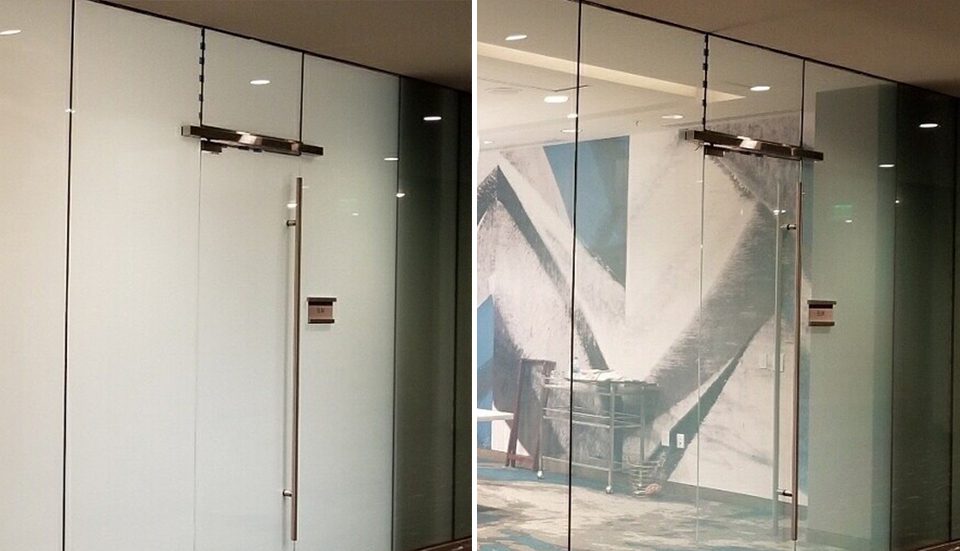
Installing tinted, frosted, or glazed windows allows natural light in while making it impossible for outsiders to see clearly inside. Switchable smart glass film can transition from transparent to opaque to prevent outsiders from seeing inside, especially at night, providing flexibility between allowing light during work hours and complete privacy when needed.
Motorized roller shades or blackout curtains provide complete coverage for privacy, particularly after dark. These window treatments give you control over visibility without sacrificing natural light during the day, and they effectively block prying eyes from seeing inside.
Smart locks or biometric systems can eliminate the need for physical keys and allow time-sensitive access for authorized personnel. If you occasionally have contractors, delivery personnel, or clients who need entry, smart locks let you grant and revoke access without key management concerns.
Reinforced entryways with sturdy doors, heavy locks, and shatterproof glazing can prevent forced entry. Your front door represents the primary physical barrier between your business operations and unauthorized access.
For outdoor spaces, traditional wood or vinyl fences create clear property boundaries along your property line. Evergreen hedges or tall, dense trees can create a “living fence” that offers year-round privacy. According to a 2023 Houzz survey, 63% of homeowners who renovated their outdoor spaces cited privacy as a top priority, indicating a strong demand for effective window tinting for businesses and other outdoor privacy solutions. Fences, landscaping, and window tinting are all effective ways to add privacy to both homes and businesses, helping to block sightlines and create secluded environments.
Integrating natural barriers such as strategically planted trees, hedges, or bamboo can create a lush, natural fence that enhances privacy in outdoor spaces while adding visual appeal. These solutions help outdoor spaces feel private and comfortable, not just physically blocked, by promoting a sense of enclosure that blends seamlessly with the environment. Using hedges or bushes as natural privacy screens should be trimmed away from entry points to minimize hiding spots for intruders.
Privacy screens, pergolas, or trellises with climbing plants can block specific sightlines where fences are restricted by local ordinances or HOA rules. Building durable fences or walls can provide immediate privacy, with materials like wood, stone, or composite being popular choices for many homeowners that complement your home’s architecture and ensure a cohesive, visually appealing look.
High-quality fencing or gates serve as a primary line of defense against unauthorized access to your property. Displaying prominent signage indicating surveillance or alarm systems serves as a psychological deterrent against would-be intruders.
Integrated smart security systems feature 4K cameras, video intercoms, and smart locks to monitor and control access remotely. AI-powered cameras that distinguish between human movement and wildlife can reduce false alarms in surveillance systems. Security systems offering local storage keep video data under the control of the property owner rather than third-party cloud services.
Requesting to blur your property on map services can address privacy considerations by preventing street-level images from revealing your home office setup or security vulnerabilities.
Privacy solutions can also shield your yard from neighbors’ view and noise, creating a more peaceful and secluded outdoor environment. This integrated approach combining digital and physical solutions creates multiple layers of protection that work together to increase privacy and maintain your sanctuary. The benefits of these privacy solutions extend beyond privacy itself, offering noise reduction, shade, increased comfort, and even environmental advantages.
Implementation Guide and Best Practices
With specific solutions identified, the implementation process requires systematic attention to prioritize actions and avoid gaps in your privacy protection.
Step-by-Step Privacy Setup Process
For new home business owners beginning privacy planning, this sequential process ensures nothing falls through the cracks:
- Conduct a privacy audit of current business setup – Inventory every location where your home address currently appears: state filings, domain WHOIS records, social media profiles, directory listings, invoices, contracts, and business cards. Rate each exposure by risk level based on accessibility and potential consequences.
- Choose and establish virtual office or registered agent service – Select a provider offering a real street address (not a P.O. Box or obvious mailbox location) that satisfies state requirements for your business entity. Verify acceptance by your state’s business registry before committing.
- Set up separate business communication channels – Establish dedicated business phone lines through VOIP services, create separate email addresses on your business domain, and configure call forwarding to route business communications during appropriate hours.
- Secure business website and online presence – Enable WHOIS privacy on all domain registrations, review and update privacy settings across social media profiles, submit removal requests to data broker sites that list your home address, and ensure your website displays only your professional address.
- Create physical privacy barriers for home office – Install appropriate window treatments that allow natural light while blocking views, add soundproofing to your office space, and secure your front door and entry points with smart locks or reinforced hardware.
- Establish client meeting protocols – Determine whether you’ll meet clients at external locations like coworking spaces or coffee shops, utilize the meeting room access included with many virtual office packages, or accept video meetings only. Create clear policies before situations arise.
- Update all business documents and registrations – Replace your home address with your new professional address across all state filings, bank accounts, vendor relationships, client contracts, and marketing materials.
- Implement ongoing monitoring and maintenance – Set calendar reminders to renew virtual office and registered agent services, periodically search for your home address online to catch new exposures, and review security system logs monthly.
Privacy Solution Comparison
Different privacy approaches offer varying combinations of cost, effectiveness, and professional impact:
| Solution Type | Cost Range | Setup Time | Privacy Level | Professional Impact |
|---|---|---|---|---|
| Virtual Office | $49–$300/month plus $50–$200 setup | 1–7 days | High: removes home from public-facing documents | High: commercial address in respected district |
| P.O. Box | $20–$50/month | Same day | Low: not accepted for most business filings | Weak: obvious P.O. Box format reduces credibility |
| Registered Agent Service | $50–$300/year per state | Same day to a few days | Very high for legal filings | Neutral: handles compliance without image impact |
| Home Office Renovation | $500–$5,000+ one-time | Weeks to months | Medium: protects in-home activities | Moderate: improves in-person meeting environment |
| Co-working Space | $150–$500/month | Immediate | Medium: separates meeting locations | High: physical presence impresses clients |
| For most privacy needs, combining a registered agent service with a virtual office address provides comprehensive protection at a reasonable budget. The registered agent ensures your home address stays out of state filings, while the virtual office gives you a professional address for all client-facing purposes. Add physical home office improvements—such as starting a tinting business relationship with a local provider or DIY window treatments—based on whether clients ever visit and how much sound isolation you need for private conversations. |
Common Privacy Challenges and Solutions
Even well-planned privacy implementations encounter obstacles. These solutions address the most frequent issues home business owners face.
Budget Constraints and Cost-Effective Options
When starting with limited resources, prioritize based on exposure risk. A registered agent service ($50–$150/year) keeps your home address off the most accessible public records—state business filings. Basic virtual office plans offering address and mail handling cost $49–$75/month and address client-facing privacy needs.
For physical improvements, DIY options maintain effectiveness while controlling cost. Dense curtains provide privacy without professional installation costs. Acoustic panels can be installed without contractor fees. Many homeowners start with these basics and upgrade to smart locks and integrated security systems as revenue allows, sometimes even exploring profitable window tinting business services as an additional revenue stream while enhancing privacy solutions.
Watch for promotional offers: many registered agent providers include the first year free when you form your business entity through their service. Virtual office providers sometimes offer discounted first-year rates, though verify renewal pricing before signing.
Family Privacy and Boundary Management
Maintaining privacy for family members requires clear protocols beyond physical barriers. When business deliveries arrive at home, establish a dedicated receiving area separate from family entrance points. Use your virtual business address for all client-facing correspondence to prevent business mail from mixing with personal correspondence.
If any client interaction occurs at your residential address—even rarely—designate specific areas that remain business-only. Family members should understand which spaces might be visible during video calls and which topics shouldn’t be discussed within earshot of your home office.
For landscaping choices, position outdoor privacy measures to protect family activity areas from the specific sightlines most likely to expose them—typically neighboring properties and street views. Evergreens provide year-round coverage while deciduous trees may leave gaps during winter months. Some entrepreneurs even choose to buy a window tinting business to offer complementary privacy solutions alongside landscaping and structural upgrades.
Compliance Issues and Legal Exposure
Some virtual addresses face rejection from banks or licensing agencies with specific requirements about address types. Before committing to any virtual office service, verify acceptance with your business bank account provider and relevant licensing bodies. Request confirmation in writing when possible.
Standard homeowners insurance policies typically limit coverage for business equipment to around $2,500 and exclude liability for business operations or client injuries on your property. Contact your insurance provider to disclose business activities and discuss adding a home-based business endorsement or separate business owner’s policy.
Missing legal notices due to registered agent failures can result in default judgments, loss of corporate protections, and state penalties. The cost of professional registered agent services—typically $100–$300 annually—pales compared to potential consequences of failed compliance.
Conclusion and Next Steps
Effective home business privacy requires multiple coordinated solutions working together—no single tool addresses every exposure point. Virtual offices create privacy and professional image separation, registered agents protect your home address in legal filings, digital privacy tools secure your online presence, and physical barriers maintain your personal space as a sanctuary for your family.
Immediate actions to take this week:
- Search your business name and your personal name online to inventory where your home address currently appears
- Research registered agent services in your state, comparing costs and features
- Evaluate virtual office providers with addresses that would enhance your professional image
- Review your domain WHOIS records and enable privacy protection if not already active
Sequential implementation over the following month:
- Establish registered agent and virtual office services
- Update state filings and all business documents with your new professional address
- Submit removal requests to data brokers listing your home address
- Implement priority physical security improvements based on your privacy audit findings
- Review insurance coverage and add business endorsements as needed
For growing businesses, advanced topics including comprehensive business insurance packages, multi-state presence establishment, and integration with professional liability coverage warrant exploration as your operations scale.
Starting with professional address services through virtual office and registered agent providers delivers the highest privacy impact relative to cost and establishes the foundation for comprehensive protection of both your business interests and personal life.
Frequently Asked Questions
Do I legally need to use my home address for my business?
No, but you must provide a valid physical street address for certain purposes. Registered agent requirements demand a street address where someone can accept legal documents during business hours. Business registration requires a principal place of business address, which can be a virtual office address in many states. Banking and licensing may have their own specific requirements—verify with each institution before assuming a virtual address will be accepted.
What’s the difference between a virtual office and a P.O. Box?
A P.O. Box provides only a postal box number without a street address, which most official uses reject—including business registration, banking, and legal filings. A virtual office provides a real street address with mail handling, forwarding, and often additional services like meeting room access and phone answering. The street address format makes virtual offices acceptable where P.O. Boxes fail.
How much does business privacy protection typically cost?
Comprehensive privacy protection costs vary based on needs: virtual office address with mail handling runs $49–$75/month for basic plans or $150–$300/month for full-service packages. Registered agent services cost $50–$300/year per state. WHOIS privacy typically costs $5–$15/year per domain. Physical improvements range from minimal DIY investments to several thousand dollars for professional installation of soundproofing, smart locks, and security systems.
Can I use privacy solutions if I’m just starting my business?
Absolutely. Early-stage businesses benefit most from privacy solutions because they prevent home address exposure before it spreads across multiple databases. Many formation services include the first year of registered agent service free. Basic virtual office plans at $49–$75/month provide essential protection without significant overhead. Starting with privacy in place costs far less than removing an already-circulating home address from public records.
What happens if clients find my home address anyway?
Despite best efforts, some exposure may occur through historical records, data broker aggregation, or inadvertent disclosure. Update any remaining instances immediately. Request removal from data broker sites. For safety concerns, establish clear client meeting protocols using external locations. In extreme cases, consulting with a privacy professional about comprehensive data removal services may be warranted.
Are virtual offices accepted by banks and government agencies?
Acceptance varies by institution and specific requirements. Most banks accept virtual office addresses that are real street addresses (not obvious mailbox formats), though some have strict KYC/AML policies requiring additional documentation. Government licensing agencies may require physical inspection capability or specific address types. Always verify acceptance directly with the bank or agency before relying on a virtual address for critical registrations.
How do I handle package deliveries for my home business?
Use your virtual business address for client-facing shipments and business vendor deliveries—most virtual office providers accept courier deliveries, not just USPS. For personal business purchases or items requiring signature, consider a dedicated delivery zone at your property perimeter, delivery locker services, or scheduling deliveries during hours when client visibility is minimal.
What privacy solutions work best for different business types?
Client-facing consultants and coaches benefit most from virtual offices with meeting room access and professional phone answering. Online businesses and freelancers can focus on digital privacy (WHOIS protection, separate communications) and registered agent services. Home-based manufacturers or service providers with inventory or equipment need robust physical security and comprehensive insurance coverage. Professional services like legal or financial consulting require all layers plus attention to client confidentiality requirements and professional liability considerations.